 Download
Snakes N Ladders The Jungle Fur
1.2 May 11, 2026- 8.4
- 1
- 2
- 3
- 4
- 5


Scythe board game companion
Anna, Gunter, Zehra et al. all have companions, so why shouldn't you? ScytheKick is your sidekick for Scythe, the award winning board game from Stonemaier games (http://stonemaiergames.com/games/scythe/).
ScytheKick lets you configure a Scythe game, optionally manage Automa players and then score the game, by navigating through a series of screens using the left and right facing Character Buttons along the bottom.
To start, you select the total player count as well as the Automa count and which expansions to include. You can access the app Settings sheet from the Mech Menu Button in the upper left corner.
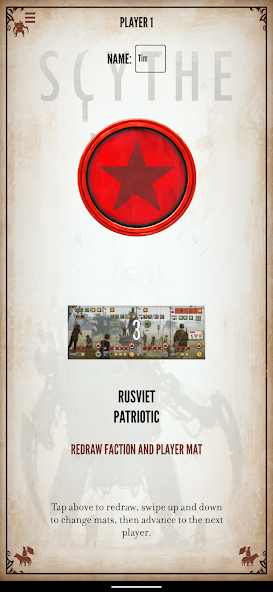
Navigate right to select the player factions and mats. The Draw Button randomly picks the mats, and allows for random repicking, or the individual mats can be selected by swiping up and down on their images. You can also enter the player names. The free version of the app lets you have two players from the base game. Additional players can be unlocked with the Premium upgrade, and Invaders from Afar factions are unlocked with the Invaders from Afar upgrade.
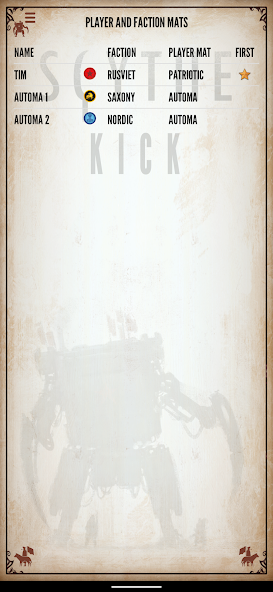
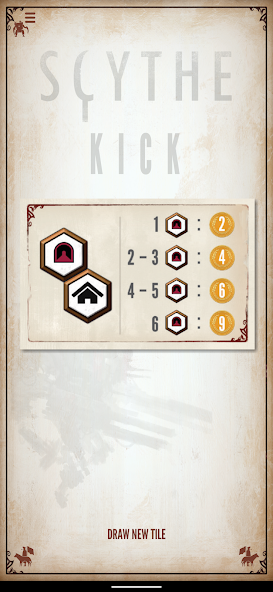
After showing a summary of the players (including who goes first), you can draw (or pick) the Structure Bonus Tiles. Additional modules (Resolution and Airship Tiles from the Wind Gambit) can be unlocked via in-app purchases.
Navigate to the scoring screens to enter the points per category (popularity, stars, etc.) per player, and ScytheKick will automatically calculate the scores. The final screen is a summary of the scores for all players, which can be shared.
If playing with Automa, after selecting the modules, you navigate to the Automa screen, which has a page for each player (human and Automa). The faction tabs indicate the current player, and there is a button to advance to the next player's turn. The Automa player page lets you draw Automa turn cards and combat cards, and will automatically track the position on the Automa's star tracker, shuffle and flip from Scheme I to Scheme II as you discard cards. If playing with the Automa Helper upgrade, a map can be called up which tracks the automa unit positions (you need to update human player units) and will solve the Automa movement rules for you. Use the menu to navigate to Scoring at the end of the game. The free version of the app lets you have one Automa player, additional players are unlocked via the Premium upgrade.
The settings sheet includes controls to:
* Manage In-App Purchases in the ScytheKick Store
* View an online user guide.
* Adjust volume
* Disable screen locking when Automa is in use
* Choosing whether Automa are friendly to other Automa players for the Automa Helper solver. Choose if Active Airship Variant is used. Select the board size for the AR Board.
* Skip calculated scores jumps over scoring screens that are automatically calculated or not used for the Automa (like popularity, or resources and structures). Smooth Popularity Track mode awards coins not just based on the three tiers on the Popularity Track, but interpolates linearly between each level and also counts odd numbers of resources. Scores at popularity 3, 9 and 15 score as normal, but scores higher and lower increase and decrease. For example, scores between popularity of 6 and 7 are closer with the setting mode on.
ScytheKick is an unofficial companion to the board game Scythe, produced with permission of the game designer. Scythe is a trademark of Stonemaier LLC. Content and art is reproduced with permission. Special thanks to Jamey Stegmaier, Jakub Rozalski, Kai Starck, Ryan Lopez DeVinaspre, Morten Monrad Pederson, David Studley and Lines Hutter.








 Action
 Simulation
 RPG
RPG Sports
 Casual
 Cards
Cards Music
Music Puzzle
 Shooting
 Romance
 Business
 Social
 Lifestyle
 Shopping
 Tools
Tools Travel
 Finance
 Education
 News
News Health